AI Product Interaction: Beyond the Chat Box
Open any AI product. You'll probably see the same thing: a chat box.
ChatGPT is a chat box. Claude is a chat box. Perplexity is a chat box. Even "AI-enhanced" SaaS products usually just add a chat box somewhere in the corner, labeled "Ask AI."
The chat box became the default. But is it the only answer?
I've been working on a homepage redesign for an AI marketing product. The core question: how should the agent exist within the product? I explored two directions—Dock and IM. Neither felt quite right. This is a note on what I learned.
Option A: Dock
The first idea came from Mac's Dock.
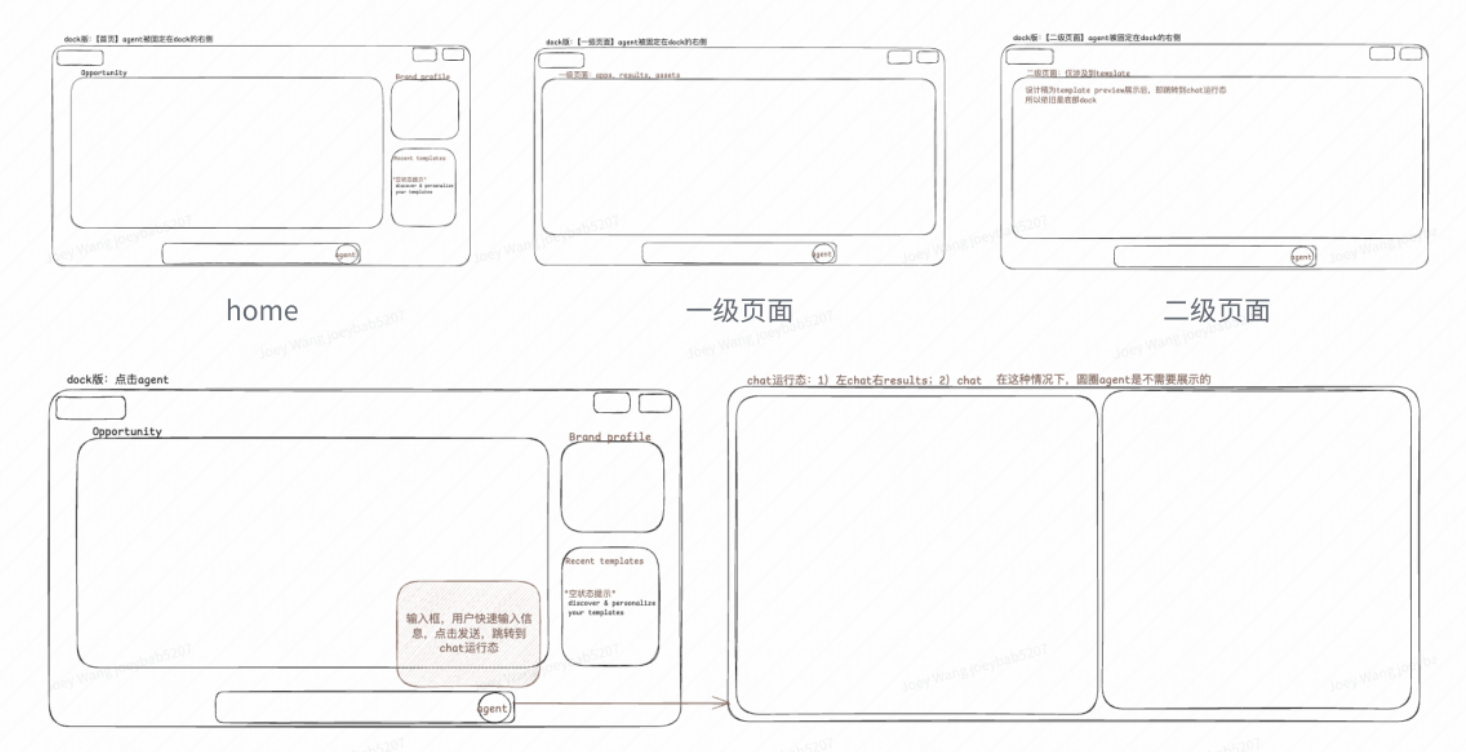
The logic: human is active, AI is within reach.
Dock sits in your first-person view. You don't need to look for it—it's always there. When you need the agent, one click. When you don't, it stays quiet.
This design fits where most AI products are today: agent still needs heavy human involvement. We're not at "AI runs everything" yet. Users still make most decisions, initiate most actions. Dock acknowledges this—human leads, AI assists.
Problems
Mac metaphor doesn't translate to web apps.
Dock is a desktop OS concept. Bringing it to a web app creates mental model conflicts. Dock is for "launching apps," not "having conversations." When users see Dock-style UI, they expect to open something, not talk to something.
Too many states.
Dock version needs to handle: dormant state (sitting at bottom), active state (input expanded), running state (full conversation view, Dock hidden). More states, more cognitive load.
Option B: IM
Second idea: borrow from Slack.
The logic: use IM patterns to express the relationship between agent and human.
Left sidebar shows different specialist agents—Nova handles UGC, Sage handles SEO, Kai handles Twitter. Each has an avatar, name, role description. Like a team roster. Middle is conversation area. Right side shows outputs.
IM is one of the most familiar interaction patterns. Putting agents in an IM frame has potential benefits:
- Relationship. Agent feels less like a cold tool, more like a team member.
- Context continuity. Conversation history is natural. Users can scroll back anytime.
- Multi-agent collaboration. Different agents work like different colleagues, each with their own specialty.
Problems
Which IM elements actually matter?
IM has many components—channels, threads, @mentions, reactions, status indicators. Which ones help express human-agent relationship? Which are just copying form without function?
Example: "read" status. In human-to-human IM, it signals the other person saw your message. In human-to-agent interaction, the agent is always "read." Does the status still serve a purpose?
How to keep the soul without copying the skin?
What's the core value of IM? Is it "conversation," "relationship," or "collaboration"?
If you just make a chat box look like Slack, it's still fundamentally the same as any chatbot. The real question: what new interaction possibilities does IM form actually enable? I don't have an answer yet.
Where's the ceiling?
IM is mature on PC. But when hardware changes—AR glasses, voice-first devices—does IM still apply? Longer-term question, but worth considering.
The Human-Agent Spectrum
While thinking through these options, I sketched a spectrum:
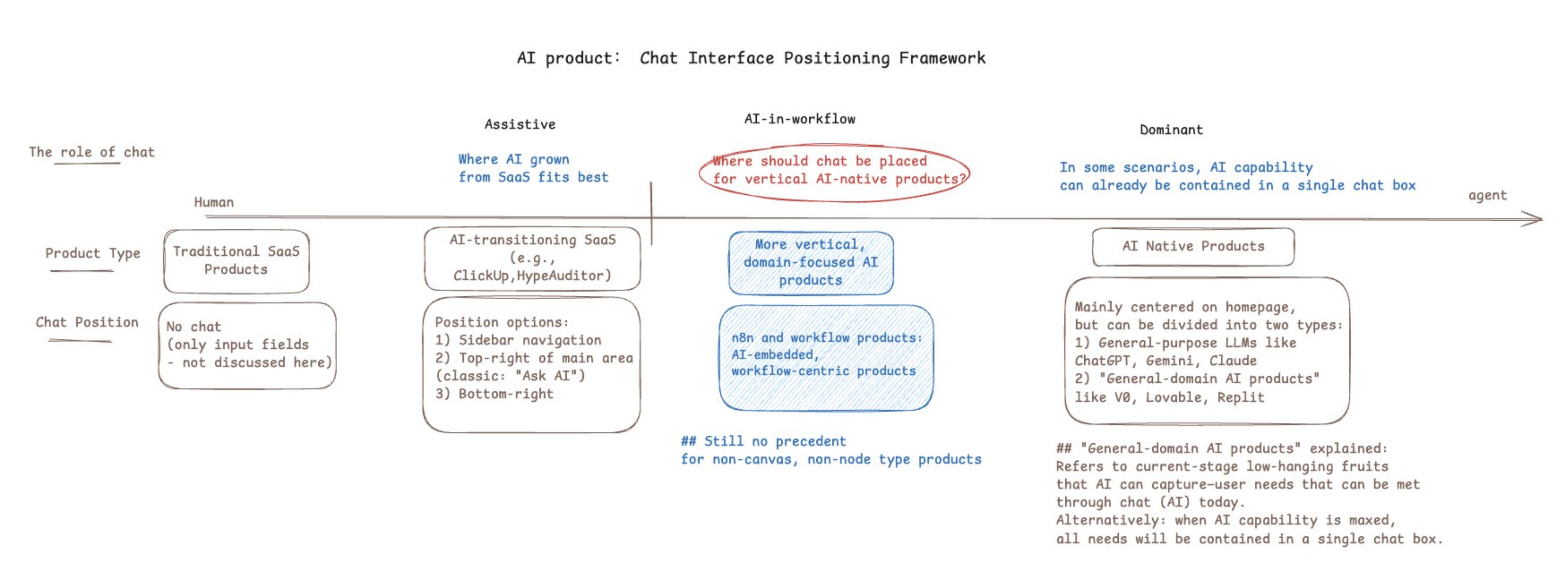
The key question in the middle—circled in red—is what I'm trying to answer: where should chat be placed for vertical AI-native products?
Most AI products sit at the extremes:
- "AI-assisted"—existing SaaS with a chat box bolted on
- "AI-led"—the entire product is a conversation interface
The middle ground—AI-in-workflow—is underexplored. Both my Dock and IM attempts were trying to occupy this space: human still leads, but agent is deeply embedded in the workflow, not tucked away in a corner.
What Granola Got Right
One product gave me useful perspective: Granola.
Granola is an AI meeting notes tool. A few things stand out about its design:
Disappearing design.
Granola doesn't join your meeting as a bot. No avatar, no "AI is recording" notification, no special meeting link needed. It records audio locally. Users click "Join Meeting" and forget about the tool.
Clear division of labor: human marks importance, AI fills in details.
Core interaction:
- During meeting, user jots quick keywords ("budget issue," "Q2 goals")
- After meeting, AI recognizes these as "what user considers important," then enriches them with full context from the transcript
Final output is a blend: human judgment + AI capability.
Deliberate timing of intervention.
- During meeting: AI is invisible
- After meeting: AI appears to "enhance" your notes
This is "partial autonomy with human verification." AI doesn't pop up mid-meeting asking "want me to summarize that discussion?" It knows when to appear and when to disappear.
The Insight: Form Follows Function
Looking back at Dock and IM, I realized I might have been asking the wrong question.
I started with: "What form should the agent take?"—Dock? IM? Sidebar? Chat box?
What Granola suggests: form is the output, not the input.
The right questions to ask first:
- In this scenario, what's the boundary between human and agent responsibility?
- What decisions should human make? What should agent handle automatically?
- When should agent intervene? When should it disappear?
Granola found this boundary for meetings:
- Human's job: mark what matters
- Agent's job: fill in details, format output
- Timing: after meeting ends
Once that boundary is clear, the interaction form emerges naturally—a minimal notes interface, invisible during meeting, one-click enhancement after.
Back to Amplift
Applying this thinking to my own product. Amplift is an AI marketing tool. Core function: help users discover growth opportunities and generate content.
Using the Granola lens:
What's the scenario?
User opens the product daily, wants to know "what opportunities are worth attention today," then decides whether to act.
What should the human-agent boundary be?
- Agent: scan, filter, recommend opportunities
- Human: judge if an opportunity is worth pursuing, decide how to act
- Agent: execute specific tasks (generate content, analyze data)
When to intervene?
- Recommending opportunities: proactive push, but not intrusive
- Executing tasks: human triggers, agent responds
This suggests neither Dock nor IM is the answer. Maybe what's needed is:
- An inbox-like opportunity feed (agent populates it)
- User clicks an opportunity, then agent appears to help execute
- Execution can be conversational or form-based
Still exploring.
Closing
AI product interaction design is early stage.
Chat box became default because it's simple, universal, easy to build. But universal often means generic—not optimized for any specific scenario.
When designing AI products for specific contexts, the question isn't "where to put the chat box." It's:
- In this scenario, what's the human-agent responsibility boundary?
- When should agent intervene? When should it disappear?
- Given the above, what interaction form is most natural?
Form emerges from the answers.
Some diagrams in this post are from internal product docs.